Your spreadsheets in VS Code. And what changed between two exports.
Open CSV, TSV, Excel and Parquet files in one fast grid inside VS Code, with the row and column count always in view and no ads, banner or account. Pro matches two tables by key, shows every changed cell and saves the report.
Your files never leave the computer that reads them: no file data is sent. The only network call is the licence check: activation needs one connection to api.gumroad.com from that computer (in a Remote-SSH, WSL or dev container window, the remote computer), through your VS Code proxy settings; after that, Pro works offline. Without a licence key, the extension makes no network call.
Free · Pro EUR 24.17 + VAT where applicable
One-time purchase · 5 machines · refund within 14 days
Or try it in your browser: CSV viewer online, free
- No ads, no banner, no account
- No file data sent
- English and French
How it works
Three steps, no account, no file data sent.
- Open the fileRight-click a CSV, TSV, Excel or Parquet file and choose Open in Novair Sheets, or run “Novair Sheets: Open Spreadsheet Files with Novair Sheets by Default…” to make it the default. The first rows show while the rest is read.
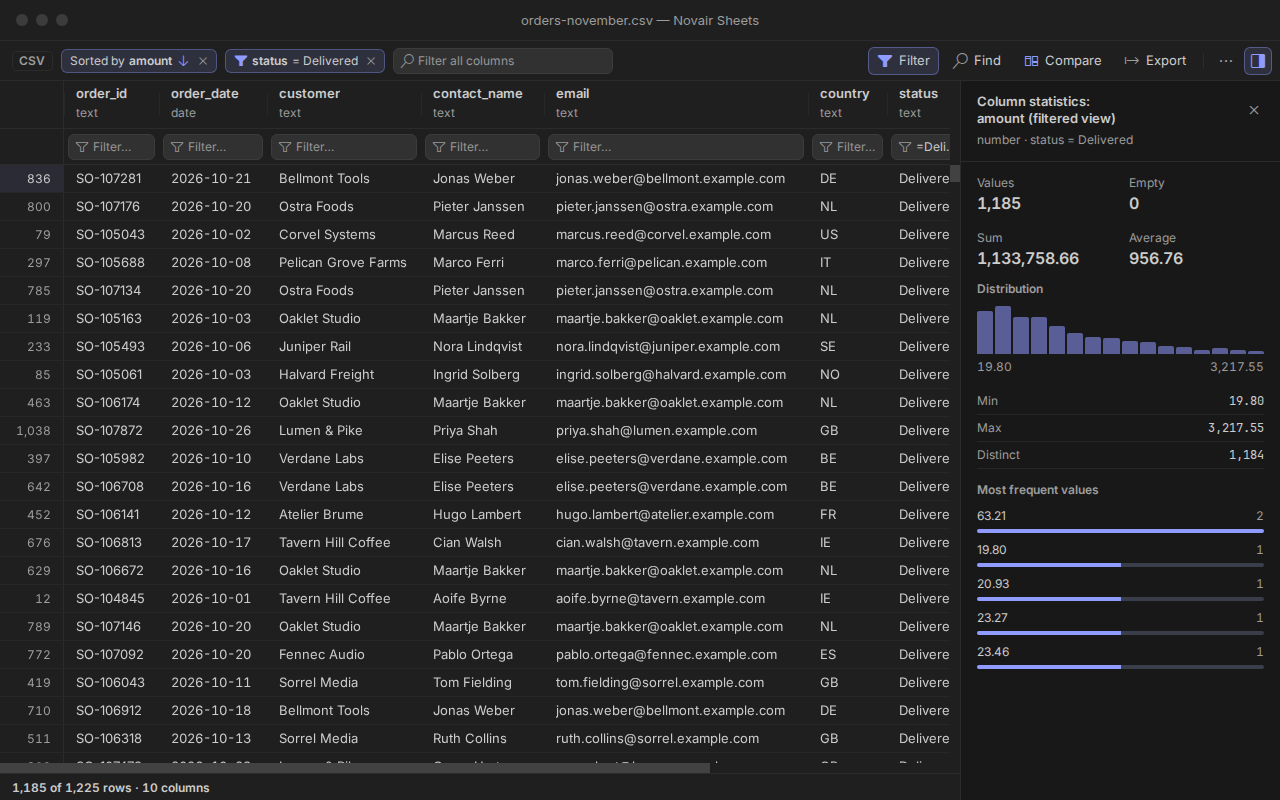
- Sort, filter, editClick a header to sort, open the filter row, find across the whole file. Edit CSV cells and Excel values, with undo: saving rewrites only what you changed.
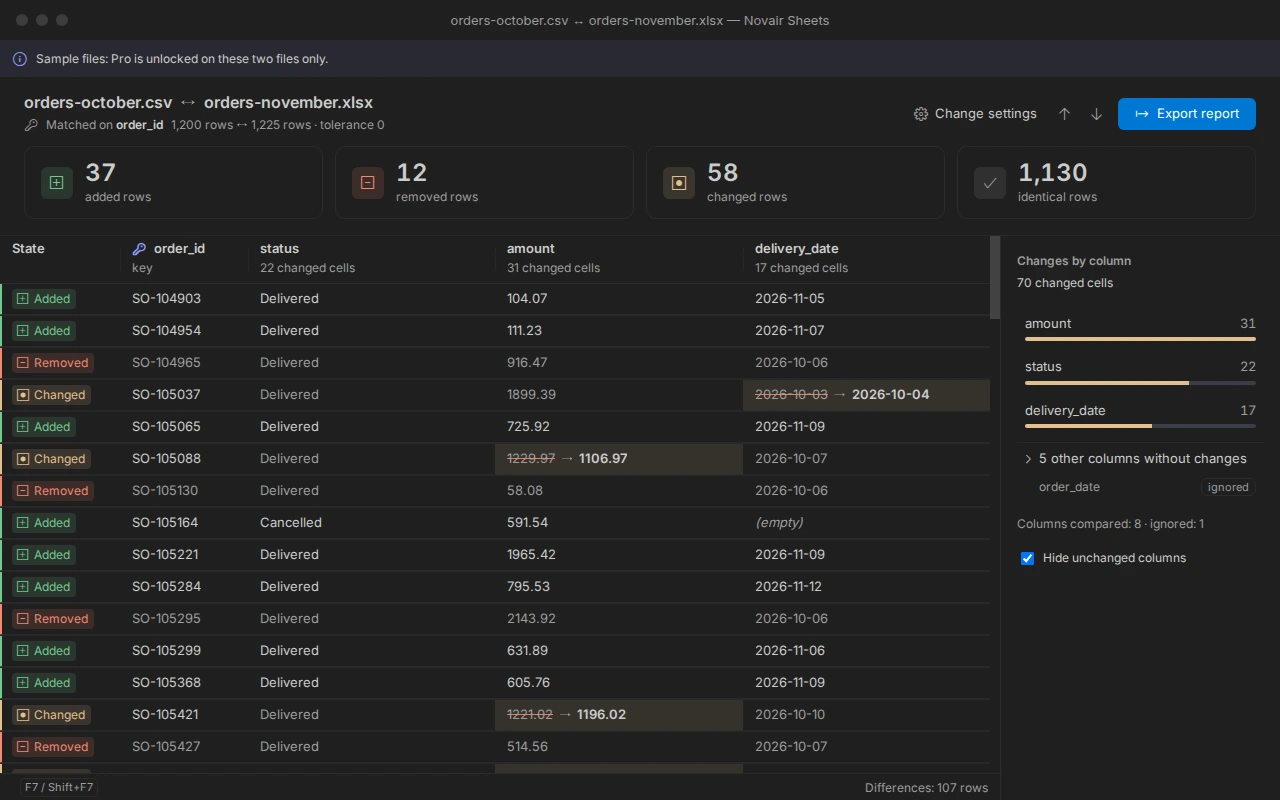
- Compare two exports (Pro)Click Compare and choose the other file: a key is proposed, then every added, removed and changed row is listed. Try it first on the sample files, with no key: “Novair Sheets: Try Compare on Sample Files”.
See it at work
Real captures of the extension in VS Code. Click one to see it full size.
What the extension does
One extension for the tables you open every day, in the editor you already use: no Python, no account, no banner.
CSV, Excel and Parquet in one grid
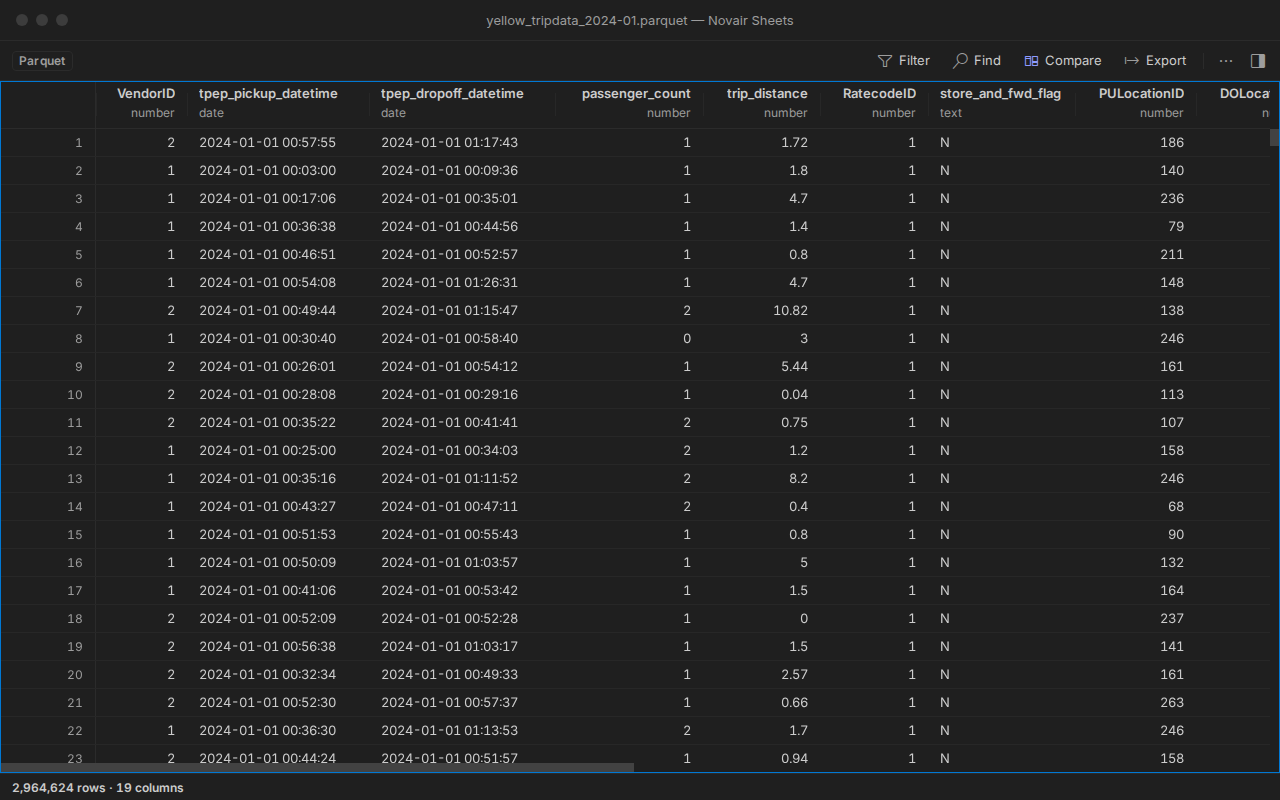
CSV, TSV, PSV, Excel (.xlsx, .xlsm, .xls), OpenDocument (.ods) and Parquet in one grid, with no Python or other tool to install.
Large files read in a stream
Large files read in a stream: the first rows show while the rest is read, and the row and column count is always visible.
Sort, filter and find everywhere
Sort, filter and find across the whole file, including rows off screen; go to a row. Separator and encoding detected and changeable from the status bar.
Edit without breaking the file
Edit CSV, TSV and PSV files, and the values of Excel cells, with undo; saving rewrites only what you changed, keeps leading zeros and never overwrites a file changed on disk without asking.
Formats and exact numbers
Excel number formats shown (currency, dates, percentages); exact Parquet decimals and 64-bit integers; nested Parquet values shown as a tree.
Column statistics and export
Column statistics: empty, distinct, min, max, average, most frequent values. Export the filtered and sorted view to CSV, TSV or XLSX; save a copy of a read-only file as XLSX or CSV.
Compare by key (Pro)
Match two tables by key (1 to 3 columns), even CSV against Excel or Parquet: every added, removed and changed row, and each changed cell, with a numeric tolerance and columns you can ignore or pair by hand.
Comparison report (Pro)
Comparison report in HTML, CSV or Excel, with every difference listed by key, ready to attach to a ticket.
Anonymized copy (Pro)
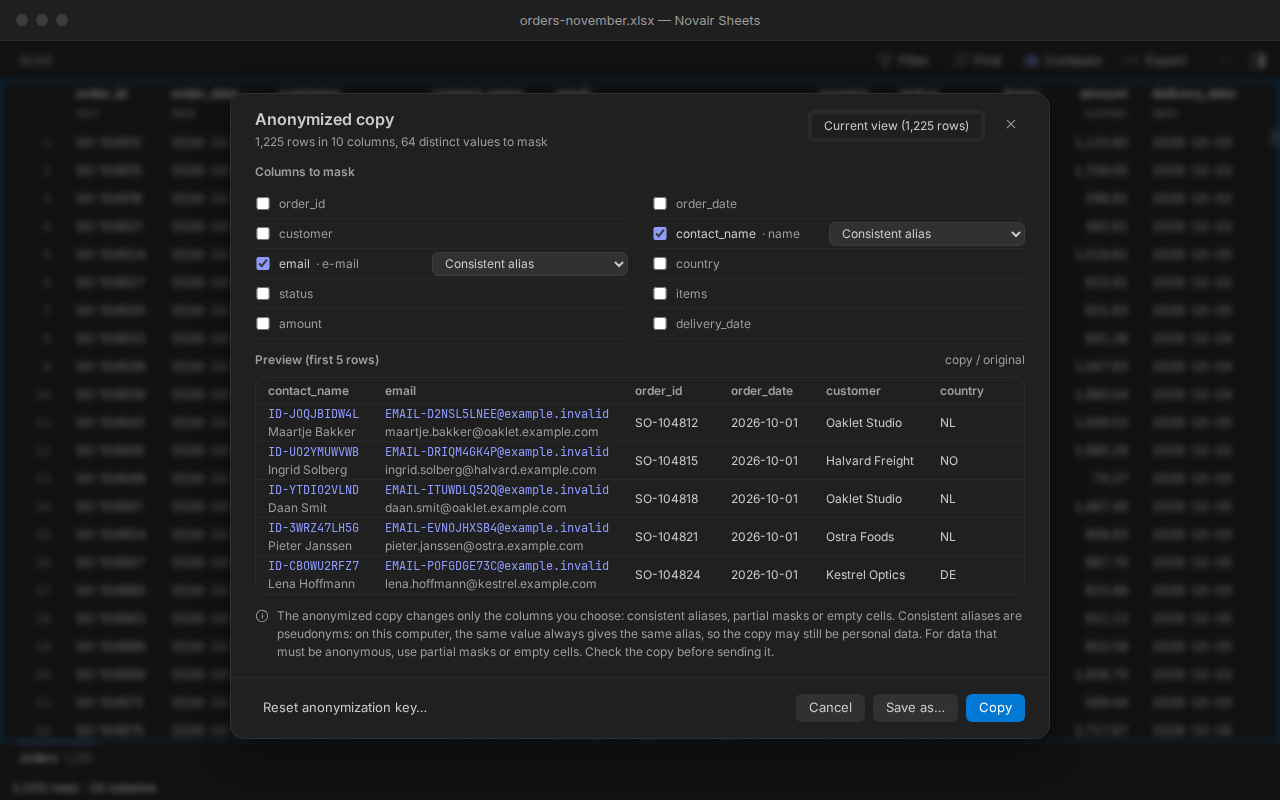
The anonymized copy changes only the columns you choose: consistent aliases, partial masks or empty cells. Consistent aliases are pseudonyms: on this computer, the same value always gives the same alias, so the copy may still be personal data. For data that must be anonymous, use partial masks or empty cells. Check the copy before sending it.
Free, and Pro when you need it
Two exports, one comparison: what was added, removed and changed, cell by cell. The free version reads, sorts, filters and edits your tables with no time limit, and even counts what a key match would find on your own files. Pro shows which rows and which cells. Try it first on the sample files, with no key: run “Novair Sheets: Try Compare on Sample Files” from the Command Palette.
Free
No time limit, no account, no banner.
- CSV, TSV, PSV, Excel (.xlsx, .xlsm, .xls), OpenDocument (.ods) and Parquet in one grid, with no Python or other tool to install
- Large files read in a stream
- Sort, filter and find across the whole file, including rows off screen
- Edit CSV, TSV and PSV files, and the values of Excel cells, with undo
- Column statistics
- Export the filtered and sorted view to CSV, TSV or XLSX
- Compare two tables by position (row 1 with row 1, and so on): counts of identical and different rows; Pro shows which ones
- Match two tables by key
- Comparison report
- Anonymized copy
Pro
One key for one person, on up to 5 machines.
- Everything in the free version
- Match two tables by key (1 to 3 columns), even CSV against Excel or Parquet
- Report in HTML, CSV or Excel, every difference listed by key
- Anonymized copy and export of the columns you choose
- All 1.x updates included
- Works offline once activated
One-time purchase · 5 machines · refund within 14 days
Payment, invoice and VAT handled by Gumroad, merchant of record.
Frequently asked questions
Are my files sent anywhere?
Your files never leave the computer that reads them: no file data is sent. The only network call is the licence check: activation needs one connection to api.gumroad.com from that computer (in a Remote-SSH, WSL or dev container window, the remote computer), through your VS Code proxy settings; after that, Pro works offline. Without a licence key, the extension makes no network call. The licence check carries the product identifier and the key, never a cell or a file. No telemetry.
Which files can it open?
CSV, TSV, PSV, Excel (.xlsx, .xlsm, .xls), OpenDocument (.ods) and Parquet in one grid, with no Python or other tool to install. Separator and encoding detected and changeable from the status bar.
How large a file can it open?
Files are read as a stream: the first rows show while the rest is read, and the row and column count stays in view. The Parquet file in the screenshots has 2,964,624 rows.
What is not covered?
Not covered in this version: editing .xls, .ods and Parquet files (save a copy as XLSX or CSV to edit it); editing formulas, and inserting or deleting rows and columns in Excel files; encrypted or password-protected files; .xlsb and .numbers files (export them as XLSX or CSV first); compressed files (.gz, .zip, .bz2, .xz, .zst, .7z: decompress them first). Charts, images and pivot tables are not shown, and are kept when you save. Macros are never run.
What is the difference between free and Pro?
Free opens, sorts, filters, edits and exports your tables, with column statistics and a comparison by position, with no time limit; on your own files it even counts the rows a key match would find. Pro shows them: every added, removed and changed row and cell, the report, and the anonymized copy. The sample files unlock all of it, with no key.
Can I send the anonymized copy as is?
The anonymized copy changes only the columns you choose: consistent aliases, partial masks or empty cells. Consistent aliases are pseudonyms: on this computer, the same value always gives the same alias, so the copy may still be personal data. For data that must be anonymous, use partial masks or empty cells. Check the copy before sending it.
On how many machines can I use my key?
One key for one person, on up to 5 machines. A machine is counted the first time the key is activated in a VS Code installation: a new computer, VS Code reinstalled with its data erased, or a non-persistent virtual desktop whose identifier changes. Entering the key again, trying again after a network error, removing and re-entering it on the same installation, or updating the extension uses nothing. New computer or VS Code reinstalled? Write to support@novair.app with your purchase e-mail and we reset the count.
How much is it, and can I get an invoice with or without VAT?
Pro costs EUR 24.17 + VAT where applicable, paid once; Gumroad, merchant of record, shows the exact amount for your country at checkout. Need an invoice? Use the “Generate” link at the bottom of your Gumroad receipt: enter your name and business address, add what your accounts need under “Additional notes”, and download the PDF. An EU business that paid VAT can enter its VAT number there: Gumroad refunds the VAT and the invoice shows no VAT. Gumroad cannot change an invoice afterwards.
How do I activate Pro?
Open the Command Palette (Ctrl+Shift+P, Cmd+Shift+P on a Mac), type “Pro key”, choose Novair Sheets: Enter my Pro licence key and paste the key from your Gumroad receipt.
My company network blocks Gumroad. What happens?
Activation needs one connection to api.gumroad.com, through your VS Code proxy settings. If it cannot get through, the free version keeps working, and you can ask for a refund within 14 days at support@novair.app.
What about updates?
All 1.x updates are included and come through VS Code Marketplace. A later version never takes away what your key unlocks.